Intro
Software development is undergoing a fundamental shift. Where AI once served as a smart autocomplete, it now operates as an autonomous participant — planning, writing, testing, and committing code with minimal human direction. This is agentic AI coding: AI systems that don't just respond to prompts but pursue goals across multi-step workflows.
For engineering organizations, this changes everything: how teams are structured, how code quality is enforced, how security is maintained, and how humans and machines collaborate. This article maps out the most important approaches, management techniques, and security practices for organizations embracing agentic AI coding at scale.
Goals
- Define most important approaches to adoption of "Agentic AI coding" in software writing organizations
- Define the techniques to manage an army of AI agents and ensure secure and well maintained software
- Define the techniques to do SECURE coding with AI
- Concretely establishing "Claude Code" as the best model for coding
Approaches to Adopting Agentic AI Coding
1. Start with Augmentation, Not Replacement
Most successful adoptions follow a progression: autocomplete → chat-driven code → inline agents → autonomous agents. Jumping straight to fully autonomous agents without building organizational muscle memory creates quality and trust deficits.
Augmentation tiers:
| Tier | Mode | Human involvement |
|---|---|---|
| 1 | Inline completion (Copilot-style) | Developer reviews every line |
| 2 | Chat-driven generation | Developer prompts and reviews blocks |
| 3 | Task-scoped agents (e.g., fix this bug, write tests for this module) | Developer reviews diffs |
| 4 | Autonomous agents on issues/PRs | Developer reviews PR, CI enforces quality gates |
Start at tier 2–3 and graduate teams to tier 4 only after establishing review and rollback practices.
2. Define the Agent's Scope of Authority
Agents must have explicit permission boundaries. Define what an agent is allowed to do without human approval:
- Read code, write code, run tests: low risk — allow autonomously
- Create PRs, open issues, update documentation: medium risk — allow with notification
- Merge PRs, deploy, modify CI/CD pipelines, touch secrets: high risk — require explicit human approval
Document these boundaries in your AGENTS.md or equivalent governance file, and enforce them technically (not just by convention).
3. Integrate Agents into the Existing SDLC
Agentic AI works best when it operates within — not around — your existing software development lifecycle. Key integration points:
- Issue trackers: Agents pick up labeled issues (e.g.,
ai-agent) and open PRs against them - CI/CD pipelines: All agent-generated code passes the same pipelines as human-written code — no exceptions
- Code review: Agent PRs go through the same review process; reviewers know the author is an agent
- Branching strategy: Agents always work on feature branches, never push directly to
main
4. Build Feedback Loops for Continuous Improvement
Agentic coding quality improves when agents learn from outcomes. Invest in:
- Structured prompts checked into version control alongside the code (e.g.,
.claude/or.github/agents/) - Metrics dashboards: PR acceptance rate, review iteration count, test coverage delta, build failure rate per agent
- Incident retrospectives: When an agent introduces a bug or regression, document what prompt or policy change prevents recurrence
5. Establish an AI Coding Center of Excellence
For organizations beyond initial pilots, a cross-functional center of excellence (CoE) accelerates safe adoption:
- Sets standards for agent configuration and prompt libraries
- Runs red-team exercises against agent-generated code
- Owns the toolchain (model selection, IDE extensions, API usage policies)
- Maintains the audit trail and compliance posture
Managing an Army of AI Agents
1. Agent Identity and Accountability
Every agent that commits code or interacts with systems must have a distinct, traceable identity:
- Use dedicated service accounts or bot users (e.g.,
agent-bot@company.com, GitHub Apps) - Sign commits with agent-specific GPG keys or use commit co-authorship (
Co-Authored-By:) to attribute agent contributions - Log all agent actions with a correlation ID linking back to the triggering task or prompt
Without identity, you cannot audit, you cannot revoke, and you cannot investigate incidents.
2. Least-Privilege Access for Agents
Agents should have the minimum permissions required to complete their task:
- Repository access: Scope to the specific repos the agent operates on; never org-wide write
- Secrets access: Agents should not have access to production secrets. Use ephemeral, scoped tokens
- Network access: Where possible, run agents in network-restricted environments; block outbound access to non-whitelisted endpoints
- Blast radius control: Run agents in isolated environments (containers, sandboxes) so a compromised or misbehaving agent cannot affect neighboring systems
3. Orchestration and Coordination
When multiple agents operate in parallel on the same codebase, coordination prevents conflicts and cascading errors:
- Exclusive locks on files or modules: Use branch-per-task to prevent simultaneous edits to the same files
- Agent queues: Don't allow unbounded parallelism; rate-limit agent task dispatch
- Dependency graphs: If agent B depends on agent A's output, enforce sequencing in your orchestration layer (e.g., GitHub Actions, Temporal, Airflow)
- Conflict resolution policy: Define what happens when two agent PRs touch the same code — automated rebase, human tiebreaker, or discard
4. Enforcing SDLC Pipelines in Agentic Systems
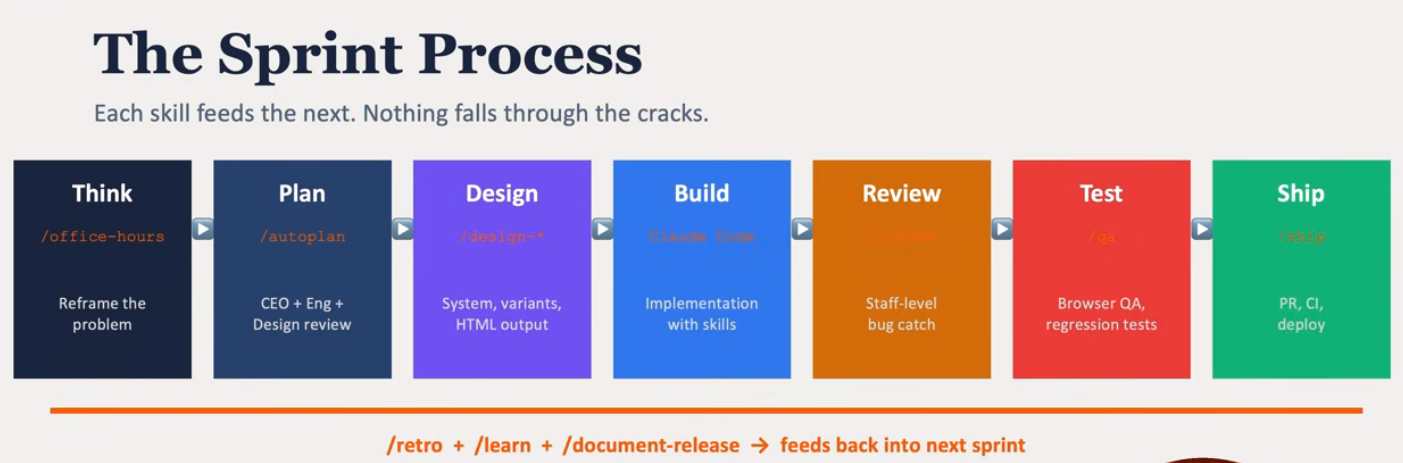
The sprint process in that image is essentially an SDLC pipeline — and the core challenge with agentic systems is they tend to short-circuit stages (jumping from "plan" straight to "build", skipping design and review). Here's how to enforce the full pipeline.
The core problem is that agents, left to themselves, will find the shortest path to "done" — which usually means skipping Think, Design, and Review entirely and going straight to Build. Here's how you force them through every stage:
- Structured output gates (strategy 1) are the most robust. Each stage must return a typed JSON schema before the next stage's prompt is even constructed. No valid PlanOutput object? The pipeline errors — it physically cannot proceed to Design.
- Stage-specific system prompts (strategy 2) mean the agent literally doesn't know the next stage exists until the current one closes. You construct and inject the Build prompt only after you've received and validated the Design artefact. The agent can't jump ahead because it has no context to jump to.
- Human-in-the-loop checkpoints (strategy 3) are what the diagram already implies with "CEO + Eng + Design review" in Plan. This is non-negotiable for high-stakes stages — a human must click approve before the orchestration continues.
- Mandatory artefacts (strategy 4) are the paper trail version: the pipeline checks for the existence of a file or URL before advancing. No /design-*.html output file? The Build stage throws, not the agent.
- The orchestrator agent (strategy 5) is the meta-level approach — a supervisor model whose only job is stage transitions. It calls each specialist agent, validates the output, and decides whether to advance or loop back.
5. Human-in-the-Loop Gates
Full autonomy is appropriate only for low-risk, reversible operations. Build mandatory human gates for:
- Any PR that modifies infrastructure-as-code, auth logic, or security-sensitive modules
- Agents that have failed more than N tasks in the past M days (circuit breaker pattern)
- Any action that cannot be trivially rolled back
Implement these gates in your CI/CD pipeline as required status checks, not optional suggestions.
6. Monitoring and Observability
An agent fleet without observability is ungovernable. Instrument:
- Agent activity logs: What did each agent do, in what order, triggered by what?
- Code quality metrics: Is agent-generated code diverging from team norms over time?
- Security scan results: Track vulnerability findings per agent, per model, per prompt template
- Drift detection: Periodically diff agent behavior against known-good baselines
Use alerting to catch anomalies: an agent opening an unusual number of PRs, touching files outside its normal scope, or triggering repeated CI failures.
7. Lifecycle Management
Agents are software. Treat them accordingly:
- Version-control your agent configurations, prompts, and tool definitions
- Test agent behavior in a staging environment before rolling out changes
- Deprecate and rotate agent credentials on a schedule
- Maintain a kill switch: a way to halt all agent activity org-wide within minutes
Secure Coding with AI
1. Never Trust Agent Output as Secure by Default
AI models are trained on public code, which includes insecure code. Common vulnerabilities introduced by AI-generated code include:
- Injection flaws: SQL injection, command injection, prompt injection in AI-adjacent code
- Hardcoded secrets: API keys, passwords, tokens embedded in source
- Insecure defaults: Disabled TLS verification, overly permissive CORS, weak cipher suites
- Dependency confusion: AI suggesting package names that may be typosquatted or unmaintained
Treat AI-generated code with the same (or higher) scrutiny as code from a junior developer unfamiliar with your security requirements.
2. Enforce Security Gates in CI
Every agent PR must pass automated security gates before merge:
- SAST (Static Application Security Testing): Tools like Semgrep, SonarQube, or CodeQL scan for vulnerability patterns
- Secret scanning: GitHub Advanced Security, Gitleaks, or Trufflehog catch hardcoded credentials before they land in history
- Dependency scanning: Dependabot, Snyk, or OWASP Dependency-Check flag known-vulnerable packages
- License compliance: Ensure AI-suggested dependencies don't introduce license conflicts
Make these checks required status checks — not advisory — so no agent PR can bypass them.
3. Security-Focused Prompt Engineering
The security of agent output starts with the prompt. Include explicit security requirements:
You are writing code for a financial services application.
Requirements:
- All SQL queries must use parameterized statements, never string concatenation
- Never log sensitive fields (passwords, tokens, PII)
- Use the project's existing auth middleware for all protected endpoints
- Do not add new dependencies without flagging them for review
Maintain a library of security-aware prompt templates checked into version control. Review and update them when new vulnerability classes emerge.
4. Code Review with a Security Lens
Human reviewers of agent PRs should apply a security-specific checklist:
- [ ] Are all external inputs validated and sanitized?
- [ ] Are secrets retrieved from the secret store, not hardcoded?
- [ ] Does new code introduce new attack surface (new endpoints, new file I/O, new subprocess calls)?
- [ ] Are error messages safe to expose (no stack traces, no internal paths)?
- [ ] Does the code follow the principle of least privilege?
Consider tagging agent PRs with a label (e.g., agent-generated) to signal to reviewers that extra security scrutiny applies.
5. Supply Chain Security for AI-Suggested Dependencies
AI models frequently suggest third-party libraries. Each new dependency is a potential supply chain risk:
- Verify package provenance: Check download counts, last update date, and maintainer reputation before accepting
- Pin dependency versions: Use exact versions or digests, not floating ranges, in AI-generated dependency additions
- Audit transitive dependencies: A safe top-level package can pull in vulnerable transitive deps
- Use a private registry or approved package list: Restrict agents to suggesting only pre-approved packages
6. Prompt Injection Awareness
When agents process external content (reading issues, summarizing PRs, parsing user-submitted data) they are vulnerable to prompt injection: malicious instructions embedded in that content.
Mitigations: - Input sanitization: Strip or escape instruction-like patterns from external content before passing it to agents - Role separation: Use separate model calls for "analyze this external content" vs. "take action on this codebase" - Output validation: Validate agent actions against a schema before executing — reject actions outside the expected envelope - Sandboxing: Limit what actions an agent can take even if successfully injected
7. Compliance and Audit Trails
For regulated industries, AI-generated code must be auditable:
- Retain the full prompt, model version, and output for every agent action
- Map agent contributions to compliance controls (e.g., PCI DSS, SOC 2, HIPAA)
- Include agent identity in change management records
- Periodically review retained logs for anomalies and policy violations
Establishing Claude Code as the Best Model for Coding
Claude Code Deployment Proposal — 70 Developers
1. Cost Model
Recommended Plan: Enterprise (Self-Serve or Sales-Assisted)
With 70 developers who all need coding capabilities, the Enterprise plan is the right fit over Team.
The Enterprise seat fee starts at $20/seat/month, billed annually. Usage is then billed separately at standard API rates on top of that, based on what your team actually consumes.
There are no per-seat usage limits and no included token allowance. Admins can set spend limits at the organization and individual user levels to manage costs.
For 70 developers:
| Component | Detail | Est. Monthly Cost |
|---|---|---|
| Seat fee | 70 × $20/seat/month (annual) | $1,400/month |
| API usage | Variable — depends on usage intensity | $500–$3,000/month typical |
| Total estimate | ~$2,000–$4,500/month |
Why Enterprise over Team:
Claude Enterprise is the right choice for organizations that have engineering teams using Claude Code across large codebases and need centralized governance over how AI is used, accessed, and audited. It also provides SSO, SCIM, audit logs, and a 500K token context window (vs 200K on Team) — critical for large codebase navigation.
Cost control levers available to you: - Admins can set spending limits at the organization and individual user level to stay within budget while maintaining flexibility for essential work. Self-serve seat management lets you purchase new seats and provision users through the admin panel. - Use the Compliance API to monitor consumption per team or project and proactively cut waste. - Route background/batch agentic tasks through the API directly at lower cost, reserving subscriptions for interactive coding sessions.
2. Interaction Methods: IDEs + Console
Your team uses IntelliJ IDEA and VS Code on Windows — both are natively supported.
VS Code Extension
A native VS Code extension is available, providing a native panel, inline edits, and IDE-style diff reviews, including plan mode and edit review. This is the most seamless experience: Claude appears as a panel inside VS Code, proposes changes as diffs, and the developer reviews and applies them without leaving the editor.
Recommended for: most developers; lowest friction; best for feature implementation, refactoring, and in-context questions.
IntelliJ IDEA (JetBrains Plugin)
The JetBrains plugin is installed via the JetBrains Marketplace (Settings → Plugins → search "Claude Code"). It uses the same credentials as the CLI. The plugin provides a chat experience with file references and conversation history, and configuration is shared via ~/.claude/settings.json.
Claude Code supports JetBrains IDEs through terminal integration. When you have TypeScript errors, ESLint warnings, or other diagnostics, there is no need to copy-paste error messages — Claude reads them from your IDE. Claude understands the IDE's file structure and can reference files directly.
Recommended for: Java/Kotlin/backend developers on IntelliJ; effectively the same experience as VS Code.
Terminal / Console (CLI)
The terminal is Claude Code's native surface and the most powerful one for agentic work. Developers run claude in any integrated terminal or standalone shell. This is essential for:
- Long-running multi-file tasks
- Script-driven automation
- Headless/CI pipeline usage
- Situations where the IDE plugin is insufficient
Recommended workflow: Use IDE plugins for day-to-day coding assistance, and drop into the terminal for complex, multi-step tasks or when triggering agentic workflows.
Windows-Specific Note
Claude Code runs on Windows via WSL (Windows Subsystem for Linux) or natively. If using JetBrains Remote Development or WSL, some extra configuration may be needed to ensure the plugin is installed in the right place and can communicate with the IDE properly. Plan for an IT-managed setup script to handle Node.js, WSL, and PATH configuration consistently across all 70 machines.
3. Agentic Workflows — Most Efficient Approaches
This is where Claude Code delivers the highest ROI at scale, especially combined with GitLab Ultimate.
GitLab CI/CD Native Integration
Claude Code's GitLab CI/CD integration is built on the Claude Code CLI and Agent SDK, enabling programmatic use of Claude in CI/CD jobs and custom automation workflows. It supports instant MR creation, automated implementation of issues into working code, project-aware behavior via CLAUDE.md guidelines, and it runs in your GitLab runners with your branch protection and approvals.
The trigger model works like this: a developer comments @claude on an issue or MR, Claude picks up the event via the CI pipeline, reads the codebase, writes a branch, and opens a Merge Request for human review. The setup is minimal: add one job to .gitlab-ci.yml and a masked CI/CD variable for the API key.
High-value automations to implement:
| Workflow | Description | Effort |
|---|---|---|
| MR from issue | @claude on an issue → Claude opens a complete MR |
Low |
| Automated code review | Claude reviews every MR for bugs, security, style | Low |
| Bug fix from failing test | Claude sees the CI failure, diagnoses and patches | Medium |
| Dependency update PRs | Scheduled agent opens MRs for outdated packages | Medium |
| Doc generation | Agent updates docs when API code changes merge | Medium |
GitLab Duo Agent Platform (Strategic Path)
GitLab Duo Agent Platform with external agents enables seamless integration with Claude directly into GitLab workflows, enabling agents to understand full project context, adhere to organizational standards, and autonomously handle complex tasks across the entire development lifecycle. Since you're on GitLab Ultimate, this platform is available to you and allows Claude to be set up as a named external agent that developers can @mention across any project.
CLAUDE.md — The Foundation of Consistent Agentic Behavior
Every repository should have a CLAUDE.md file at the root. This is the single most important configuration for getting consistent, high-quality agentic output. It should define:
- Code style and conventions
- Which files/directories Claude should and should not touch
- Testing requirements (must run tests before proposing MR)
- Branch naming conventions
- Review criteria and security constraints
The agent reads these instructions before starting any task. Any CI pipeline that can run a shell command can run an AI agent — the platform-specific features add convenience, but the underlying pattern works everywhere.
The Five Agentic Patterns (by complexity)
Claude Code supports five core workflow patterns: sequential (one agent, all steps in order), operator (a controlling Claude plans and delegates to sub-agents), split-and-merge (parallel work recombined), agent teams (multiple agents with shared coordination), and headless (fully automated, event-driven, no human in the loop). Most teams should start with sequential and add complexity only when the simpler pattern breaks down.
For 70 developers, the practical progression is:
- Month 1–2: All developers use IDE plugins interactively. Establish
CLAUDE.mdstandards. - Month 2–3: Enable GitLab CI trigger for
@claudeon MRs. Start with code review automation. - Month 3+: Build headless pipelines — scheduled agents, automated MRs from issues, regression analysis on CI failures.
Cost Discipline for Agents
Route simple, frequent requests to lighter models to keep costs down, and reserve complex requests for more capable models via the CI pipeline. This keeps the cheap things cheap. For your 70 developers, consider using Claude Sonnet for interactive coding sessions and Claude Opus only for complex architectural reasoning or agentic multi-step pipelines.
Summary Recommendation
| Dimension | Recommendation |
|---|---|
| Plan | Enterprise ($20/seat/month + usage) |
| Seats | 70 × Enterprise seats |
| VS Code users | Claude Code extension from VS Marketplace |
| IntelliJ users | Claude Code plugin from JetBrains Marketplace |
| Console | WSL + Claude CLI for agentic/complex tasks |
| GitLab | CI/CD integration + GitLab Duo Agent Platform |
| First automation | @claude MR review on all merge requests |
| Cost controls | Per-user spend caps via Admin panel |
| Governance | Managed policy settings for tool permissions, file access, MCP server config |
For pricing specifics and a custom contract (which makes sense at 70 seats), I'd recommend contacting Anthropic's sales team directly at anthropic.com/contact-sales. They can offer volume commitments, invoicing in CHF, and tailored support.
Would you like me to draft a one-page executive summary, a cost comparison table, or a technical setup guide for your IT team?
Summary
Adopting agentic AI coding is not primarily a technology problem — it is a governance, process, and culture problem. The organizations that succeed treat agents as powerful but untrusted collaborators: scoped, observed, and held to the same quality and security standards as human developers. The table below summarizes the key practices:
| Area | Key Practice |
|---|---|
| Adoption | Progressive tiers, scope-bounded authority, SDLC integration |
| Agent management | Identity + least privilege, orchestration, human gates, observability |
| Secure coding | CI security gates, secure prompt templates, supply chain hygiene, prompt injection defense |
The goal is not to slow down AI coding — it is to make it fast and trustworthy.
Links